Alienware AW2725DF Review and Buying Guide
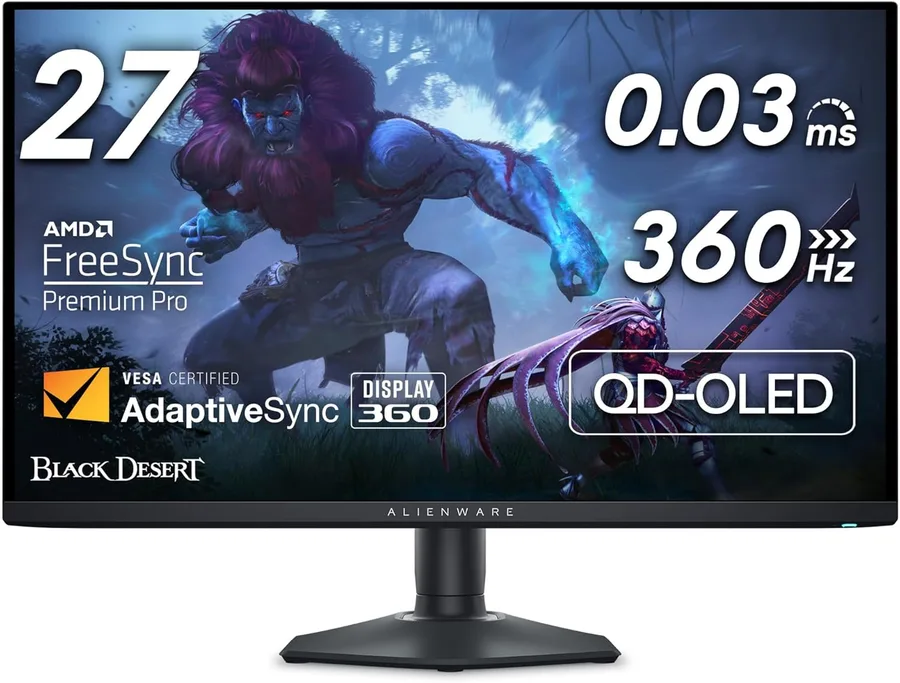
The Alienware AW2725DF is best understood as a monitor built around a specific balance of panel technology, resolution, speed, desk usability, and regional value. Instead of treating every display as if it serves the same buyer, this guide reads the actual stored specifications for this model and turns them into a practical buying recommendation. The current data points show 27 inch, 2560 x 1440 (QHD) resolution, QD-OLED panel technology, and 360Hz refresh rate. That combination tells us where the monitor is naturally strong, where it may need a closer look, and which buyer should shortlist it.
For most people, the first question is not whether the monitor is technically impressive. The real question is whether it matches the work or entertainment setup they are building. A high-refresh gaming desk, a creator workstation, a USB-C laptop dock, and an office productivity station all stress different parts of the spec sheet. On this model, the automatic purpose analysis currently rates gaming at 9.5/10, esports at 9.8/10, creator work at 8.7/10, office productivity at 7.8/10, movies and HDR at 9.0/10, and overall value at 8.5/10. Those scores are built from refresh rate, response time, resolution, panel type, brightness, USB-C support, and feature completeness.
Display Quality and Everyday Clarity
The display experience starts with resolution and panel type. A 2560 x 1440 (QHD) screen changes how much workspace you get, how sharp text appears, and how hard your graphics card has to work in games. Because this model uses a more performance-friendly resolution, it can be easier to drive at high frame rates. That matters for users who do not want to overspend on GPU power just to get smooth gameplay.
Panel technology affects the personality of the monitor. OLED is the most obvious strength here. It gives very deep black levels, fast pixel transitions, and a cinematic look that LCD panels struggle to match. The trade-off is that buyers with static dashboards, long office hours, or fixed UI elements should still be mindful of image retention habits.
Gaming, Motion, and Responsiveness
Refresh rate and response time decide how responsive the monitor feels in motion. The Alienware AW2725DF is listed at 360Hz with a 0.03ms response time. That puts it in the serious high-refresh category, where competitive players can benefit from smoother tracking, lower perceived latency, and cleaner fast movement.
Adaptive sync also matters because it helps reduce tearing and uneven frame pacing when the graphics card output changes during gameplay. This model lists AMD FreeSync Premium Pro, VESA AdaptiveSync, NVIDIA G-SYNC Compatible. If you already know whether your system uses NVIDIA, AMD, or a console, this line is worth checking before purchase. The smoother the monitor can match your hardware, the more consistent the experience feels in real use.
Productivity, Creator Work, and Desk Setup
For work, the monitor should make the desk easier to use, not just look impressive on a product page. Screen size, resolution, ergonomics, USB-C, KVM, and connectivity are the big factors. This model lists DisplayPort 1.4, HDMI 2.1, USB upstream, USB downstream, headphone line-out. The USB-C power delivery entry is No USB-C Power Delivery listed, which is useful for laptop owners who want one cable for display, charging, and desk peripherals. Ergonomics are listed as Height, tilt, swivel, pivot adjustable stand, and VESA support is listed as 100 x 100mm VESA compatible.
Creator suitability depends on resolution, size, color gamut, panel behavior, and brightness. This model lists 99.3% DCI-P3, Delta E < 2 and 1000 nits of brightness. If your work involves color-critical delivery, you should still verify independent color measurements, but the stored specs are enough to determine whether the monitor belongs in a creator shortlist. For office users, the bigger question is comfort over many hours: sharp text, low eye strain, enough ports, and a stand that fits your desk.
HDR, Movies, and Entertainment
HDR is one of the most misunderstood monitor features because a label alone does not guarantee a dramatic image. The Alienware AW2725DF lists VESA DisplayHDR True Black 400, HDR Peak 1000 mode. That is a promising sign for entertainment use, especially when combined with the listed panel and brightness data. It should be more appealing for cinematic games, movies, and contrast-heavy scenes than a basic SDR monitor.
Pros, Cons, and Buying Verdict
The clearest strengths are: Very fast 360Hz refresh rate for esports QD-OLED contrast and near-instant response QHD resolution is easier to drive than 4K 99.3% DCI-P3 color coverage These are the reasons the model deserves attention. The main caution points are: No USB-C laptop charging listed No KVM listed OLED static-content care still matters Console users should verify HDMI behavior for their exact setup This is why the monitor should be matched carefully against your use case rather than bought only because the headline specs look strong.
Overall, the Alienware AW2725DF makes the most sense for buyers focused on high-refresh gaming, competitive esports, HDR movies and cinematic games. The public score is 4.6/5 based on the available community ratings, votes, service signals, and saved specification data. The page currently has 0 star ratings and 0 like/dislike votes. The final buying decision should come down to current country price, warranty comfort, and whether the listed features match your hardware. Use the affiliate link on this page to open the correct regional store, then confirm the exact SKU, return policy, and included cables before purchase.