
Monitor datasheet
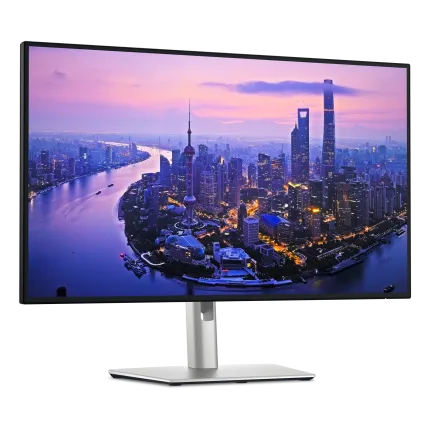
Dell UltraSharp U2725QE
Dell U2725QE is listed with 27" 4K, IPS Black, 120Hz refresh, 5ms response time, and 450 nits brightness.
27"
4K
IPS Black
120Hz
450 nits
United States store link is live
Opens Amazon in a new tab. Verify exact model number, seller, return window, and warranty terms before purchase.
Affiliate links may earn commission at no extra cost. MonitorSuggest does not show guessed Amazon search URLs as exact product links.
US matched
MRI43/100
Score8.7
Rating0.0/5
Votes0
Selected Amazon store
Amazon link for your region
Only the active country product-detail link is shown. If this monitor does not have a saved link for your country, MonitorSuggest falls back to the saved Amazon US product link.
🇺🇸 United States Amazon
Amazon amzn.to | ASIN B0F18Q2GPN
Affiliate links may earn commission at no extra cost. Verify exact model, seller terms, return window, and local warranty before buying.
Matched selected region
Amazon US View Store
Data transparency
How this monitor page is built
This page combines saved monitor specifications, use-case scoring, selected-region store context, and community signals. It is designed for buyer research, not as a lab-tested review unless a page clearly states otherwise.
WhoReviewed by Yash Sadaphule
Maintained with visible author, policy, and correction paths.
HowSpecs + signals
Uses listed specs, purpose scores, ratings, votes, and store-link coverage.
Community sample0 ratings / 0 votes
Community data is a signal, not an official ranking or certification.
Last updatedAugust 9, 2026
Verify seller, model number, return window, and warranty terms before purchase. Active store region: US.
Use-case fit
Good For and Not Good For
Purpose scores show the saved strength signals. The fit cards translate those numbers into practical buying scenarios for Dell UltraSharp U2725QE.
Strongest fitCasual gaming
Main cautionCompetitive gaming
Good For
- Casual gamingPlayable motion and general gaming specs are strong enough for story, sports, and everyday games.
- Editing / creatorResolution, color, and workspace signals are helpful for creator or editing work.
- Developer / officeText clarity, workspace, connectivity, or desk comfort signals fit longer productivity sessions.
- Movies / HDRPanel contrast, HDR, or brightness signals make it suitable for movies and cinematic games.
- Laptop dockingUSB-C power delivery is listed, so single-cable laptop desk setups are easier to consider.
Not Good For
- Competitive gamingRefresh rate or response-time signals are not ideal for serious esports buyers.
Full feature table
Specifications
| Brand | Dell |
|---|---|
| Model | U2725QE |
| Screen size | 27 inch |
| Resolution | 4K |
| Panel type | IPS Black |
| Refresh rate | 120Hz |
| Response time | 5ms |
| Brightness | 450 nits |
| HDR certification | VESA DisplayHDR 600 |
| Color gamut | 100% sRGB, 99% DCI-P3, 99% Display P3 |
| Adaptive sync | HDMI 2.1 VRR |
| Connectivity | HDMI 2.1, DisplayPort 1.4 in/out, Thunderbolt 4 upstream/downstream, USB-C upstream, USB-A hub, RJ45 2.5GbE, 3.5 mm audio out |
| Aspect ratio | 16:9 |
| Curvature | Flat |
| Contrast ratio | 3000:1 |
| USB-C power delivery | Thunderbolt 4 USB-C up to 140W EPR |
| KVM | Yes |
| Ergonomics | Height, tilt, swivel, pivot |
| Speakers | None |
| VESA mount | 100x100 mm |
| Native resolution | 3840 x 2160 4K UHD |
| Pixel density | 163 PPI 27-inch 4K panel |
| Brightness | 450 nits typical / 600 nits HDR Manufacturer spec |
| Built-in devices | Ambient light sensor Productivity comfort feature |
Swipe left or right to view the complete specification table.
Buyer verification checklist
What to verify before relying on this page
Use this checklist with the specification table above. It keeps MonitorSuggest helpful for research while reminding readers to confirm the details that can change by seller, country, and exact model revision.
Match the saved model name, suffix, size, panel, refresh rate, and product image with the store page before buying.
Store buttons and availability signals follow the active country selector. Switch region if you are checking another store.
Specs, purpose scores, ratings, and votes help shortlist options. They do not replace hands-on testing unless a page clearly says so.
If a feature, link, or country signal looks wrong, use the correction/contact path so the page can be reviewed and updated.
Votes, ratings, and owner feedback use visitor/IP/session checks, moderation, and optional proof notes before they become public trust signals.
Pros
- Sharp 27-inch 4K text clarity with 120Hz motion.
- IPS Black panel and 3000:1 contrast suit dark UI work.
- Thunderbolt hub, KVM, RJ45, and 140W PD simplify desk setups.
Cons
- Not aimed at high-refresh esports.
- Premium hub features make it costlier than basic 4K office monitors.
Similar monitor paths
Similar monitors to consider
Use these as research paths after checking the specification table, pros, cons, and fit signals for Dell UltraSharp U2725QE.
Similar
BenQ PD3205U
This monitor shares some saved specification signals with the current model, such as panel, size, or resolution.
Open monitorAlternative
BenQ PD3205U
This may be a practical alternative when the saved specifications and current store availability match your setup.
Open monitorPremium
Alienware AW2725DF
This may be worth checking if you want a higher-scoring or more feature-rich option based on saved monitor data.
Open monitorPeople also compared
Compare Dell UltraSharp U2725QE with nearby options
These shortcuts use similar saved signals such as brand, panel, resolution, size, or quality score. Use them to check trade-offs row by row.

LG UltraGear 32GS95UE-B
32" | 4K | 240Hz
Compare both

ASUS ROG Strix OLED XG27ACDNG
27" | 1440p | 360Hz
Compare both

Samsung Odyssey OLED G8 G80SD
32" | 4K | 240Hz
Compare both

Samsung Odyssey OLED G6 G60SD
27" | 1440p | 360Hz
Compare both
Review and buying guide
Dell UltraSharp U2725QE buying notes
Dell U2725QE review summary
The saved Dell U2725QE profile combines 27-inch, 4K, IPS Black, 120Hz, 5ms, 450 nits with purpose scores and user signals. That makes the page useful for shortlisting, not just checking one headline spec.
Motion and gaming fit
The 120Hz refresh rate is more suitable for everyday use, media, and casual play than serious high-refresh competitive gaming. The listed 5ms response time means buyers should watch for ghosting or smearing feedback, especially in darker fast-moving scenes.
Text clarity and workspace
The 4K-class resolution is the main clarity advantage. It can help text, spreadsheets, creative timelines, and high-resolution media, especially at 27 inches and above.
Panel behavior
The IPS panel signal usually favors viewing-angle consistency and all-round work comfort, while contrast and black depth may be less dramatic than OLED or VA.
Desk setup and connectivity
USB-C power delivery is a useful desk signal here because it can simplify laptop docking with fewer cables, provided the wattage matches your laptop.
Movies, HDR, and room use
The 450-nit brightness listing is workable for many rooms and basic HDR expectations, but it should not be treated as a guarantee of premium HDR.
Research path
Research Dell UltraSharp U2725QE against nearby monitors
Do not judge this monitor from one specification alone. Use the saved specs, purpose scores, user signals, selected-region Amazon link, and comparison pages together before deciding whether this model fits your desk, games, work, or media setup.
MonitorSuggest does not show guessed product links as exact store URLs. Open retailer pages only when the saved country-specific product URL exists, then verify the exact model number, seller, return policy, and local warranty terms.
Share your monitor experience
Community rating
FAQ
Frequently asked questions
Is Dell U2725QE good for gaming?
Dell U2725QE is most useful for gaming when its 120Hz refresh rate, 5ms response time, adaptive-sync support, and gaming score match the games you play. Check the esports score separately if you mainly play competitive titles.
Is Dell U2725QE good for office or developer work?
For office and developer use, focus on text clarity, screen space, ergonomics, and ports. This model is listed as 27-inch with 4K, so compare that against your desk distance and scaling preference.
What panel type does Dell U2725QE use?
Dell U2725QE is listed with a IPS Black panel. Panel type affects contrast, viewing angles, motion clarity, black levels, and how comfortable the screen feels for long sessions.
How bright is Dell U2725QE?
The saved brightness signal is 450 nits. Brightness matters for daylight rooms, HDR expectations, and whether whites stay comfortable without pushing the monitor near maximum output.
What is Dell U2725QE best for?
Based on saved specs and purpose scores, the strongest fit signal is Casual gaming. Use the Good For and Not Good For boxes on this page to confirm the exact buying scenario.
What is Dell U2725QE not ideal for?
The main caution area is Competitive gaming. This does not mean the monitor is unusable there; it means another model may fit that use case better.
Does Dell U2725QE have country-wise Amazon links?
If exact product URLs are saved for US, India, UK, or Canada, the country-wise Amazon buttons appear on this page. MonitorSuggest does not show guessed Amazon search URLs as product links.
What should I verify before buying Dell U2725QE?
Confirm the exact model number, seller name, return window, included cables, warranty terms, panel variant, and country-specific availability on the retailer page before purchase.
Are the Dell U2725QE ratings lab test results?
No, unless the page explicitly says otherwise. MonitorSuggest combines listed specifications, saved data, community ratings, votes, and practical interpretation rather than claiming hands-on lab measurements.